Take your Merch by Amazon advertising to the Next Level
A powerful tool to easily create and manage your AMS campaigns
Demonstration: a recreation of the extension's products and campaigns view with sample data, showing a design being dragged into its campaign.
Products
- I Love Akita Cute Canine Dog Best Friend DoggyStandard T-Shirt · Oct 17 2019 · None
- My Best Friend Border Collie Cute Canine Dog Best Friend DoggyStandard T-Shirt · Apr 20 2020 · None
- Good Doggy Boxer Cute Canine Dog Best Friend DoggyStandard T-Shirt · Feb 25 2020 · None
- I Love Dalmatian Cute Canine Dog Best Friend DoggyStandard T-Shirt · Jun 14 2020 · None
- My Best Friend Foxhound Cute Canine Dog Best Friend DoggyStandard T-Shirt · Jul 27 2020 · None
- Good Doggy Alaskan Malamute Cute Canine Dog Best Friend DoggyStandard T-Shirt · Mar 02 2020 · None
- I Love Cairn Terrier Cute Canine Dog Best Friend DoggyStandard T-Shirt · Aug 09 2020 · None
- My Best Friend Chow Chow Cute Canine Dog Best Friend DoggyStandard T-Shirt · Sep 21 2020 · None
- Good Doggy Airedale Terrier Cute Canine Dog Best Friend DoggyStandard T-Shirt · Jan 30 2020 · None
Campaigns
- Affenpinscher (AdGroup1)3 items
- Airedale Terrier (AdGroup1)5 items
- Akita (AdGroup1)2 items
- Alaskan Malamute (AdGroup1)4 items
- Border Collie (AdGroup1)3 items
- Boxer (AdGroup1)2 items
- Dalmatian (AdGroup1)5 items
- Foxhound (AdGroup1)1 items
- Cairn Terrier (AdGroup1)2 items
- Chow Chow (AdGroup1)3 items
- Made by Merch sellers for Merch sellers
- All your data is processed locally and never gets sent anywhere
- Free on the Chrome Web Store
Do you know which of your designs are in campaigns and which aren’t?
We can tell you
Find them, and then Drag ‘n Drop them into their campaigns with Merch SuperSystem Ads.
Features
Bulk campaign creation & editing
Create new campaigns in a fraction of the time it takes manually
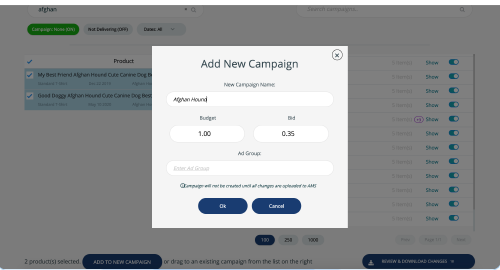
- 1Add New Campaign
- 2Budget and Bid
- 32 product(s) selected
Super easy drag and drop system!
Quickly imports all your designs from Merch and all your campaigns from AMS
Choose any of your designs from your product list on the left and simply drag them into existing campaigns (or create new ones) on the right.
For your convenience you can search using keywords or filter by dates to find specific designs you’ve uploaded to work on.
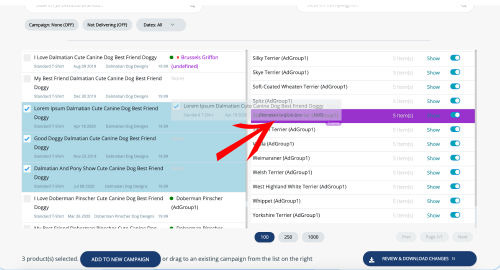
- 13 product(s) selected
- 2Dragged onto Spitz (AdGroup1)
- 3Search campaigns
Introducing Campaign Noning
This awkwardly named feature lets you always know if your designs are being advertised. When turned on, your product list will show only designs without a campaign. Keep adding them to campaigns until the list is empty!
Did you reupload a design and now need to re-advertise it? Added new designs to a niche that already has a campaign?
With SuperSystem it’s unbelievably simple to locate designs which are not in campaigns and add them to the most relevant campaign or to a new campaign
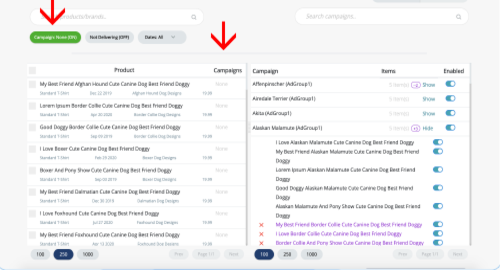
- 1Campaign: None (ON)
- 2Products with no campaign
- 3Campaigns and their products
Make sure your ads are live
Sometimes we pause ads or campaigns and forget about them. That’s understandable given how many campaigns most of us are running. Now you can just flip a switch and see all of your designs that are in campaigns but aren’t being delivered to customers, and decide if they should stay that way or get turned back on.
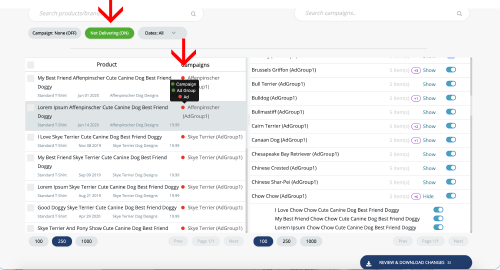
- 1Not Delivering (ON)
- 2Campaign, ad group and ad status
- 3Enable or pause the campaign
Stay organized – Take control of your ad spend!
Don’t overpopulate your advertising account with too many overlapping campaigns.
All your data in one secure interface
The chrome extension pulls data from both AMS and Merch into one interface
All your data is processed locally and never gets sent anywhere, ever.
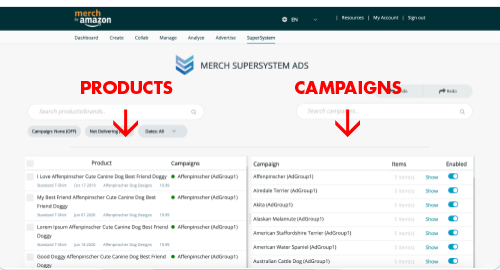
- 1Merch by Amazon dashboard
- 2Products, from Merch
- 3Campaigns, from AMS
Easy Setup
It all comes together to streamline your workflow
- Add to Chrome
- 60 Second Sync
- Done
Watch it work
Merch SuperSystem’s answers to existential questions: – Who are we? – Why did we create this tool? – What does it do?
All tutorialsPricing Plan
Professional Pack
$29.99 /per month
- Unlimited New Campaign Creation
- Drag and Drop: Add Products To Existing Campaigns
- Smart Filtering:
-Find Products Without Campaigns
-Find Products That Aren't Delivering - Enable / Pause Campaigns
- Enable / Pause Individual Ads
Who We Are
Made by Merch sellers for Merch sellers
We’ve made hundreds of thousands of dollars from Merch to date. We initially developed this tool for our own use but figured it can have value for the community and decided to release it. We hope this will help MBA sellers scale their business like it helped us and save them valuable time and money.
Contact us